
DTF Artwork Requirements and File Formats
For the best DTF printing results, artwork should be 300 DPI at its final print size, have a transparent background, use fully opaque colours, and contain lines at least 0.5 mm thick. Do not mirror or reverse your artwork before uploading it.
Our online DTF Gang Sheet Builder accepts files from a wide range of artwork and design programs. Review the requirements below before submitting your gang sheet for printing.
What File Formats Does the DTF Gang Sheet Builder Accept?
The DTF Gang Sheet Builder accepts the following file formats:
- PNG
- SVG
- JPG
- PSD
- AI
- EPS
Vector files such as SVG, AI, EPS, and some PDF files are preferred because they can be resized without losing image quality.
What Resolution Should DTF Artwork Be?
Raster artwork should be created at 300 DPI at the actual size you want it printed. This helps produce sharp, high-quality DTF transfers.
After you upload your artwork, the Gang Sheet Builder evaluates its resolution using colour-coded quality indicators. The software will also alert you if images on your gang sheet overlap.
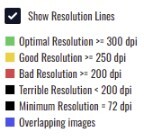
Increasing the dimensions of a small, low-resolution image will not improve its quality. Low-resolution artwork may appear:
- Blurry
- Pixelated
- Fuzzy when printed
Does DTF Artwork Need a Transparent Background?
For the best DTF printing results, artwork should have a transparent background unless you intentionally want the background included in the finished print.
A transparent background ensures that only the intended design is printed, without an unwanted white box, coloured rectangle, or visible edges surrounding the artwork.
What Size Should My DTF Artwork Be?
Use our DTF Gang Sheet Builder to resize your artwork to the exact dimensions required for printing. Always review the displayed width and height before adding the completed gang sheet to your cart.
Should I Mirror My DTF Artwork?
No. Upload your artwork in its normal reading direction. Do not mirror, flip, or reverse the image before uploading it. Your transfers will be produced in the correct orientation for application.
Can DTF Artwork Include Semi-Transparent Elements?
For best results, avoid translucent, semi-transparent, or low-opacity elements. DTF printing works best with solid, fully opaque colours.
Transparent effects may print differently than they appear on screen and can result in:
- Unexpected colour changes
- Visible artefacts or unwanted edges
- Uneven gradients
- Inconsistent opacity on the garment
What Is the Minimum Line Thickness for DTF Artwork?
For clean and durable DTF prints, lines and small details should be at least 0.5 mm thick.
Very thin lines and fine details may not collect enough adhesive powder during production to bond properly to the garment when heat-pressed. This can result in:
- Incomplete transfers
- Peeling or lifting
- Missing or broken details
- Reduced wash durability
Can DTF Printing Match Exact Colours?
Although we strive to produce vibrant and accurate prints, exact colour matching cannot be guaranteed with DTF printing.
Printed colours may vary slightly from what appears on your screen due to:
- Monitor and screen settings
- RGB-to-print colour conversion
- Garment colour, texture, and fabric composition
- Printer profiles and ink characteristics
- The white ink underbase used in DTF printing
For colour-sensitive projects, we recommend ordering a small test print before proceeding with a larger production run.